Moving Time
This blog is moving over to www.soundbarrier.io. That is all.
Companions of Progress
During the emergence of electronic communication, the two scientists/engineers Carl Friedrich Gauss and Wilhelm Eduard Weber built the first electrical communications line in Goettingen, Germany. They set up a two kilometer two wire copper line between Gauss’ workplace – the Astronomical Observatory – and Weber’s laboratory in the physics department of the Goettingen University.
It is unknown what the content of the first telegram sent was but one story goes like this: Gauss sent the message: “Michelmann kömmt” or “Michelmann is on his way” to Weber. While the message was transmitted, Michelmann, an assistant of both Gauss and Weber traveled the distance between the two sites, allowing the scientists to confirm the accuracy of the message 0.
Michelmann is a messenger or courier in this story. He helps Gauss and Weber demonstrate that their system works and that messengers can be replaced by electronic communication. I find it amusing and somewhat ironic that Michelmann played the role of verifying a technology that would take over some of his own responsibilities – relaying messages between Gauss and Weber.
Today technology is again taking over responsibilities previously held by humans: it trades stocks, drives cars and diagnoses and treats diseases. Sometimes I like to put myself in the shoes of those modern-day Michelmanns: humans that participate in handing over parts of their responsibilities to machines. Stock-brokers and data scientists that feed their knowledge into automated trading systems, ride sharing drivers that seed the offline maps for autonomous cars, medical doctors that train expert systems and image recognition algorithms to automate diagnosis and treatment.
Are these people aware of what they are doing? And how long until my job (software architect) can be replaced by a machine? Am I already doing what Michelmann did in 1832 by writing and fixing code and committing it to public repositories? I want to say: I hope so. But then again I’m only 97% convinced it is a good thing.
1. Another version of the story has Gauss send the message “Wissen vor meinen, Sein vor scheinen” which roughly translates to “Knowing is more important than believing, being is more important than appearance”. It is possible that they sent both messages, one test message and one message for posterity.↩
Definining Data Decomposition across CUDA, OpenCL, Metal
When attempting to solve computational problems using accelerators (for example graphics processing units) a central challenge is to decompose the computation into many small identical problems. These small problems are then mapped to execution units of a given accelerator and solved in parallel.

The three household low level accelerator frameworks are CUDA, OpenCL and Metal. Next to mapping sub-problems to execution units they also allow for sub-problems to be grouped together. Groups of sub-problems have certain interesting properties:
- they can be synchronized and
- they can share data.
Accelerator frameworks thus ask developers to define two layers of data decomposition: (1) the overall size of the problem space and (2) the size of a group of sub-problems.
Moving a problem from one accelerator framework to another or implementing a solution using multiple accelerator frameworks can be interesting. Frameworks are very similar but the devil is in the detail. There is no standard of mapping sub-problems to execution units. Both the naming conventions and the semantics are different:
| CUDA | OpenCL | Metal | Aura | |
|---|---|---|---|---|
| level 1 | grid | global work | threads per group | mesh |
| level 2 | block | local work | thread groups | bundle |
| overall | grid * block | global work | threads per group * thread groups |
mesh * bundle |
I added to this table the naming convention and semantics for for the Aura library that is under development. The library wraps the three standard accelerator frameworks and exposes a single API for all three.
CUDA 7 Runtime Compilation
Nvidia recently announced CUDA 7 will come with a runtime compilation feature. I find this quite interesting for two reasons. First and foremost, this is something OpenCL could do from the beginning, in fact, that is how OpenCL works. Pass a kernel string to the OpenCL library at runtime, get back something you can call and run on a device. With CUDA you have to compile to PTX, which in turn could be passed as a kernel string to the CUDA runtime or driver API1. So CUDA actually tries to catch up with OpenCL here – an interesting role reversal. Usually OpenCL is behind CUDA.
The second point is that now Nvidia either has to ship a more or less complete C++ compiler with their driver. Or software vendors have to ship this runtime compilation feature with their products. The idea of making a C++ compiler available at runtime seems ludicrous and ingenious at the same time. I wonder what possibilities this opens up in general, beyond runtime parameter tuning. It is obvious that the more the compiler knows the better it can optimize.
But this is not new in the realm of graphics programming APIs. Both Direct3D and OpenGL involve runtime compilation of shader code. The model of 2-stage offline compilation to generic byte-code and runtime compilation for a specific device that CUDA uses also exists in graphics programming.
A direct consequence for my Aura C++ accelerator programming library is that by constraining kernel code to C99 and using a few preprocessor macros as well as wrapper functions, OpenCL and CUDA kernels can now look exactly the same and can be defined in the same way. I hit a wall in this regard recently, due to the PTX generation requirement in CUDA. I started thinking about an additional build step that extracts kernel strings, feeds them to the CUDA compiler, and re-embeds the resulting PTX in the source code. This seems now superfluous.
This new feature will be valuable to other C++ GPU programming libraries too. Recently reviewed (and accepted) Boost.Compute could add a CUDA backend without too much effort – OpenCL and CUDA kernels are not very different. VexCL could use this feature as an alternative to requiring the CUDA compiler installed on the target system. ArrayFire could replace their JIT PTX generation facilities with a JIT C++ generator. Exciting possibilities.
- An alternative is to generate PTX at runtime, a method ArrayFire uses to fuse element-wise operations. CUDA kernels can also be compiled to device code directly at compile time.
SyCL
The fourth post in my C++ accelerator library series is about SyCL. SyCL is a royality-free provisional specification from the Khronos group. It is spear-headed by Edinburgh, UK based Codeplay Software. Its aim is to simplify programming many-core vector co-processors and multi-core vector processors by offering a modern C++ interface on top of OpenCL. The main selling point of SyCL is similar to that of C++ AMP: single-source development and inline kernels. That means kernel code can be embedded within C++ code. To that effect, kernel code can also be templated, something that is not possible using standard OpenCL1.

SyCL builds upon a new abstraction – the command_group. It groups “lists of OpenCL commands that are necessary to perform all the work required to correctly process host data on a device using a kernel”. When acting in concert with the command_queue type it also represents an novel attempt of expressing a dataflow graph. I suspect it is also a means for a SyCL compiler to find and extract the code necessary to generate the proper device kernel. In addition it is supposed to simplify memory management. This is what SyCL looks like:
std::vector h_a(LENGTH);             // a vector
std::vector h_r(LENGTH);             // r vector
{
  // Device buffers
  buffer d_a(h_a);
  buffer d_r(h_r);
  queue myQueue;
  command_group(myQueue, [&]()
  {
    // Data accessors
    auto a = d_a.get_access();
    auto r = d_r.get_access();
    // Kernel
    parallel_for(count, kernel_functor([ = ](id<> item) {
      int i = item.get_global(0);
      r[i] += a[i];
    }));
  });
}
For each command_group a kernel is launched and for each kernel the user specifies how memory should be accessed through the accessor type. The runtime can thus infer which blocks of memory should be copied when and where.
Hence, a SyCL user does not have to issue explicit copy instructions but informs the runtime about the type of memory access the kernel requires (read, write, read_write, discard_write, discard_read_write). The runtime then ensures that buffers containing the correct data are available once the kernel starts and that the result is available in host memory once it is required. Besides simplifying memory management for the user, I can guess what other problem SyCL tries to solve here: zero-copy. That is to say, with such an interface, code does not have to be changed to perform efficiently on zero-copy architectures. Memory copies are omitted on zero-copy systems but the same interface can be used and the user code does not have to change.
Between the accessor abstraction and host memory is another abstraction: the buffer or image. It seems to be a concept representing data that can be used by SyCL kernels that is stored in some well defined but unknown location.
The buffer or image in turn use the storage concept. It encapsulates the “ownership of shared data” and can be reimplemented by the user. I could not determine from browsing the specification where allocation, deallocation and copy occurs. It must be either in the accessor, the buffer or the storage. Oddly enough, storage is not a template argument of the buffer concept but instead is passed in as an optional reference. I wonder how a user can implement a custom version of storage with this kind of interface.
Kernels are implemented with the help of parallel_for meta-functions. Hierarchies can be expressed by nesting parallel_for, parallel_for_workitem and parallel_for_workgroup. Kernel lambda functions are passed an instance of the id<> type. This object can be used by each instance of the kernel to access its location in the global and local work group. There are also barrier functions that synchronize workgroups to facilitate communication.
To summarize, I applaud the plan to create a single-source OpenCL programming environment. With standard C++11 or even C++14 however, for this to work an additional compiler or a non-standard compiler extension is required. Such a compiler must extract the parallel_for meta-functions and generate code that can execute on the target device. As of the publication of this article, such a compiler does not exist. There is however a test-bed implementation of SyCL that runs only on the CPU.
In addition, I fear that the implicit memory management and command_group abstractions might be to inflexible and convoluted for SyCl to become a valuable foundation one can build even fancier things on.
An update:
Andrew Richards (Founder and CEO of Codeplay) adds that they are working on simplifying storage objects. He also believes that the runtime will have enough information best performing scheduling and memory access. Codeplay is going to use a Clang C++ compiler to extract kernels into OpenCL binary kernels but there is no release date yet.
- an exception to this is the the OpenCL Static C ++ Kernel Language Extension that is implemented by AMD, it allows overloading in kernel functions, template arguments, namespaces and references
Embedded OpenCL Hardware
For quite some time I have been looking for a suitable development device to do GPGPU on ARM embedded hardware. My requirements are inexpensive, ARM platform, running Linux, shared memory between CPU and GPU with GPGPU capable drivers as well as GPGPU libraries available (OpenCL or CUDA). I plan to add such a device to my small zoo of machines that compile and test my accelerator programming library Aura. Here are the options I considered:
- Jetson TK1 (currently no OpenCL support)
- Arndale Octa Board
- ODROID-XU3
- Samsung Chromebook (article about how to use them for development)
There are other boards with GPUs that can run OpenCL. Among them is for example the pandaboard ES. Unfortunately it is difficult or rather impossible to obtain OpenCL drivers and libraries for these. I picked the ODROID-XU3 since I could order it from a local supplier here in Germany. 3 days after placing the order it arrived. It comes with no accessories except for a power supply and a plastic case. So I ordered a 16GB micro SD card with the board since SD cards are cheaper than eMMC.
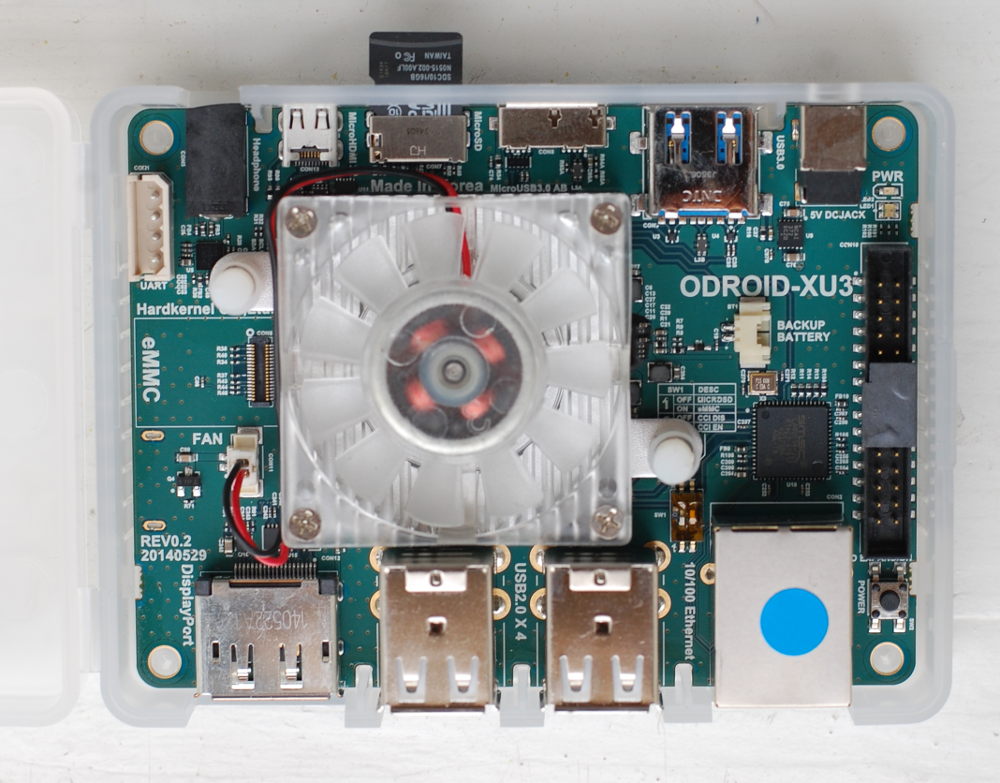
Installing and booting the operating system was a breeze. I chose the Ubuntu 14.04 LTS server from the Odroid download page, since an X server is not necessary for my undertakings. I plugged the SD card into my Notebook and followed the instructions.
# /dev/sdX represents the micro SD card in this example
cd ~/Downloads
md5sum ubuntu-14.04lts-server-odroid-xu3-20140902.img.xz
# compare md5 from website
xz -d ubuntu-14.04lts-server-odroid-xu3-20140902.img.xz
# make sure the card is not mounted
sudo umount -f /dev/sdX
# fill the card with zeros (optional)
sudo dd if=/dev/zero of=/dev/sdX bs=4M
# copy the image
sudo dd if=/home/USER/Downloads/ubuntu-14.04lts-server-odroid-xu3-20140902.img of=/dev/sdX bs=4M
sync
I then proceeded with resizing the root file system for the file system to fill the entire SD card. I used gparted for this. I’m not sure if this was necessary (or even a good idea) but I wanted to make sure I had enough room to install libraries and tools, compile things and store test data. Before I could boot from the SD card, I had to switch the boot mode selector in the right position. By default it was set to eMMc boot (left switch was on) so I switched the left switch to off. I put the SD card in the board, connected it to my router, connected the power-supply et voilà: it booted up (it has a nice RGB led that lights up in all colors during boot). I then checked if the router issued an IP number (it did) and proceeded with logging into the system via SSH using the root user and the password odroid.
The gcc suite was already preinstalled with the image I used, the same was true for git. I installed cmake and downloaded the latest boost libraries. Building the libraries I needed (thread, system, test, chrono, atomic) took about 10 minutes. I could not find any libOpenCL file on the system so I figured I hat to install those myself. I found a comprehensive howto explaining how OpenCL can be installed on a chromebook that had the correct link to the ARM Mali download site. I downloaded MALI-T62x for fbdev from 13th of August 2014 and extracted the contents of the file to /usr/lib. I could obtain the OpenCL header files from here.
I cloned my library and tried to build the unit tests. The linker complained about missing OpenCL functions (all of them were missing). After a short investigation I now conclude that for OpenCL to work on this board, I need to link both libOpenCL.so and libmali.so. After I added the Mali library to the build file, everything compiled and all unit tests passed. Yay!
An update:
Playing more with the system I discovered that only root can run OpenCL code. Turns out a chmod a+rwx /dev/mali0 fixes that.
C++ AMP
The third post in my C++ accelerator library series is about C++ AMP. C++ AMP is many things: a programming model, a C++ library and an associated compiler extension. It can be used to program accelerators, that is GPUs and other massive parallel coprocessors. And it is an open specification that constitutes a novel way of describing data parallelism in C++. Very exciting.

This is what C++ AMP looks like:
const int size = 5;
int aCPP[] = {1, 2, 3, 4, 5};
int bCPP[] = {6, 7, 8, 9, 10};
int sumCPP[size];

array_view a(size, aCPP), b(size, bCPP);
array_view sum(size, sumCPP);

parallel_for_each(
	sum.extent,
	[=](index<1> idx) restrict(amp)
	{
		sum[idx] = a[idx] + b[idx];
	}
);
I believe the appeal of this programming model is immediately visible from the above code sample. Existing, contiguous blocks of data that should be computed on are made known to the runtime through the array_view concept. Parallel computation is expressed inline through a call to the parallel_for_each meta-function. The loop boundaries are specified, an index object is created that is used in the following lambda function to describes the computation on a per element basis. The programmer says: “do this for each element”. It is high-level, it is inline, it is terse, it is pretty.
The downsides of this model can be uncovered by asking a few key questions: When is data copied to the accelerator (if that is necessary)? When are results copied back? Can the underlying array be modified after the view is created? Is the meta-function synchronous or asynchronous? C++ AMP does a great job at behaving as one would expect without any extra effort when these questions are irrelevant. In my opinion this programming model was designed for an audience that does not ask these questions.
If these questions are important things start to get a little messy. Data copying to accelerators starts when parallel_for_each is invoked. Results are copied back when they are accessed from the host (through the view) or when they are explicitly synchronized with the underlying array. If the underlying array can be modified after the view is created depends on the plattform. If it supports zero-copy, that is, host and accelerator share memory, the answer is: probably no. If code is written with a distributed memory system in mind the answer is: probably yes. The parallel_for_each function is asynchronous. It is queued and executed at some point in the future. It does not return a future though. Instead data can be synchronized explicitly and returns a future (source).
C++ AMP has many more features beyond what the above code example shows. There are tiles that represent the well known work-groups (OpenCL) or blocks (CUDA). There are accelerator and accelerator_view abstractions to select and manage accelerators. There are atomics, parallel_for_each throws in case of errors for simplified error handling and there is more.
There exists an implementation by Microsoft in their Visual Studio product line and a free implementation my AMD together with Microsoft. There is supposed to be an implementation by Intel called Shelvin Park but I could not find anything about it beyond the much cited presentation here. Indeed, in June of 2013 Intel proclaimed that they are looking into different solutions that ease the programming experience on their graphics processors but none are in a status that they can share today (source). Microsoft on the other hand is doing a good job at marketing and documenting C++ AMP. Their Parallel Programming in Native Code Blog has some helpfull entries including for example “How to measure the performance of C++ AMP algorithms?“.
For me the central feature of C++ AMP is the elegant way kernels can be implemented inline. The concepts they built around that are great but could be designed better. The problem is: if you go one level below what C++ AMP is on the outside things get messy. But it does not have to be this way. There are simple and well understood concepts that underly the whole problem that is accelerator/co-processor programming. I would love to see a well thought out low level abstraction for accelerator programming that C++ AMP builds upon and that programmers can fall back to if circumstances require it.
Move Now
Last week it was my great pleasure to attend the C++Now conference in Aspen. This is my trip report.
Due to snow the day before the conference and the remote location of Aspen, the conference got off to a rough start for most attendees. But almost everybody arrived in time. The conference got going with an interesting keynote by Gabriel Dos Reis and got better from there. Michael Caisse’s tutorial about the canonical class set the stage for what would become one of the central themes of the conference. The title of this report reflects this theme as well.

Just what does it mean to move an object? In particular, what can you expect from the thing that you moved from? And what is this thing anyway? Eric Niebler had a well thought out opinion on this topic. He argued that a moved-from object should not break its invariants. This makes it a lot easier to reason about code. Not everyone agreed with this. Sean Parent for example argues, that a programmer can only expect to destroy and reassign a moved-from object.
Following this reasoning, he presented an unsafe move operation that does not change the moved-from object. This is unsafe because bad things will happen if such an object is destroyed and then the moved to object is used or destroyed. So the unsafe move requires the programmer to do something with the moved from object – usually moving another object there. Sean stated that this trick can improve performance by up to 15% when for example reverse is called on a large container. David Sankel responded to this proposal in his talk with a simple “No!” and presented a better solution. Instead of breaking the invariants of the container, he added another container that does not have the original invariants and thus allows unsafe operations. For a list, such a container would be called ListFragments. Fragments are extracted from the list, some operations not legal on lists are performed on the fragments, and the fragments are put back into the list. This way, no invariants are broken. And Sean Parent approves of this idea.
For me, the second theme of the conference was asynchrony. Christophe Henry, the author of the Boost Meta State Machine library presented his latest creation Boost Asynchronous. In an exciting talk he convinced his audience that most approaches to asynchrony are doomed, and that he thinks he has found an elegant solution. From the discussion that followed his talk it became clear that there are some similarities between his work and that of the HPX library. Another talk on that topic was about the libcppa project and its application in a high performance network security auditing database.
Followers of the gospel of functional programming could enjoy the excellent talks by David Sankel and Bartosz Milewski. Louis Dionne presented initial results from his work on MPL11, the metaprogramming library proposal for C++11 and onwards. Ábel Sinkovics presented his interactive metaprogramming shell based on Clang. These two meta-programming wizards delighted their audience with deep insights into the language and an excellent tool to explore and exploit the language.
My own talk about accelerator programming libraries on the last day of the conference went well. However I ended the talk with the feeling that something was missing. And indeed, I got some feedback that maybe some performance comparison of the different libraries I reviewed would be interesting. And that is what I am working on now.
All in all, C++Now was an educating and delightful experience. I hope to go back next year.
Boost.Compute
This is the second post in my C++ accelerator library series. It is about Boost.Compute, a header-only C++ accelerator programming library developed by Kyle Lutz and others. It is based on OpenCL and is released under the Boost 1.0 license. The name of the library, the license, as well as the documentation suggest that Boost.Compute one day will apply for an official review by the Boost community to become a part of the Boost C++ library suite. Acceptance into Boost can be a stepping stone to inclusion into the C++ Standard. But this is not the only reason why it is worthwhile to take a look at Boost.Compute.
Boost.Compute manages memory through the compute::vector
All functions resulting in commands issued to an accelerator accept an optional command_queue argument. A command_queue has a wait function to block until completion of all enqueued commands. In addition, barriers and markers can be enqueued in a command_queue for additional control over asynchronous operations. These are in my opinion all the tools necessary to express concurrency and control command-level parallelism.
Boost.Compute comes with a multitude of parallel primitives. These STL like functions compose the core of Boost.Compute. This is an incredible amount of accelerator-enabled general algorithms and I believe a listing of the more complex functions is in order:
/**
  Returns the result of applying function to the elements in the
  range [first, last) and init.
 */
T accumulate(InputIterator first, InputIterator last, T init,
  BinaryFunction function)

/**
  Returns true if value is in the sorted range [first, last).
 */
bool binary_search(InputIterator first, InputIterator last,
  const T & value)

/**
  Performs an exclusive scan on the elements in the range
  [first, last) and stores the results in the range beginning
  at result.
 */
OutputIterator exclusive_scan(InputIterator first,
  InputIterator last, OutputIterator result)

/**
  Calls function on each element in the range [first, last).
 */
UnaryFunction for_each(InputIterator first, InputIterator last,
  UnaryFunction function)

/**
  Copies the elements using the indices from the range [first, last)
  to the range beginning at result using the input values from the
  range beginning at input.
 */
void gather(MapIterator first, MapIterator last,
  InputIterator input, OutputIterator result)

/**
  Performs an inclusive scan on the elements in the range [first, last)
  and stores the results in the range beginning at result.
 */
OutputIterator inclusive_scan(InputIterator first,
  InputIterator last, OutputIterator result)

/**
  Returns the inner product of the elements in the range
  [first1, last1) with the elements in the range beginning at first2.
 */
T inner_product(InputIterator1 first1, InputIterator1 last1,
  InputIterator2 first2, T init,
  BinaryAccumulateFunction accumulate_function,
  BinaryTransformFunction transform_function)

/**
  Merges the sorted values in the range [first1, last1) with the sorted
  values in the range [first2, last2) and stores the result in the range
  beginning at result. Values are compared using the comp function.
 */
OutputIterator merge(InputIterator1 first1, InputIterator1 last1,
  InputIterator2 first2, InputIterator2 last2,
  OutputIterator result, Compare comp)

/**
  Calculates the cumulative sum of the elements in the range
  [first, last) and writes the resulting values to the range beginning
  at result.
 */
OutputIterator partial_sum(InputIterator first,
  InputIterator last, OutputIterator result)

/**
  Randomly shuffles the elements in the range [first, last).
 */
void random_shuffle(Iterator first, Iterator last)

/**
  Returns the result of applying function to the elements in the range
  [first, last). Requires the binary operator to be commutative.
 */
void reduce(InputIterator first, InputIterator last,
  OutputIterator result, BinaryFunction function)

/**
  Performs left rotation such that element at n_first comes
  to the beginning.
 */
void rotate(InputIterator first, InputIterator n_first,
  InputIterator last)

/**
  Copies the elements from the range [first, last) to the range
  beginning at result using the output indices from the range
  beginning at map.
 */
void scatter(InputIterator first, InputIterator last,
  MapIterator map, OutputIterator result)

/**
  Sorts the values in the range [first, last) according to compare.
 */
void sort(Iterator first, Iterator last, Compare compare)

/**
  Performs a key-value sort using the keys in the range
  [keys_first, keys_last) on the values in the range
  [values_first, values_first + (keys_last - keys_first)) using compare.
 */
void sort_by_key(KeyIterator keys_first, KeyIterator keys_last,
  ValueIterator values_first, Compare compare)

/**
  Sorts the values in the range [first, last) according to compare.
  The relative order of identical values is preserved.
 */
void stable_sort(Iterator first, Iterator last, Compare compare)

/**
  Transforms the elements in the range [first, last) using transform
  and stores the results in the range beginning at result.
 */
OutputIterator transform(InputIterator1 first1, InputIterator1 last1,
  InputIterator2 first2, OutputIterator result, BinaryOperator op)

/**
  Transforms each value in the range [first, last) with the unary
  transform_function and then reduces each transformed value with
  reduce_function.
 */
void transform_reduce(InputIterator first, InputIterator last,
  OutputIterator result, UnaryTransformFunction transform_function,
  BinaryReduceFunction reduce_function)
There is no special support for numerical analysis but a number of numerical operations can be built from aforementioned parallel primitives.
Boost.Compute provides a number of built in functions to pass to the parallel primitives but programmers may also specify custom functions. This can be done by creating an instance of a compute::function. A shorthand macro BOOST_COMPUTE_FUNCTION() simplifies this task. Next to custom functions, programmers can also declare a BOOST_COMPUTE_CLOSURE() with the added benefit of capturing variables that can then be used within the accelerator function. As a third option, programmers can specify a lambda expression instead of a custom function object. This is accomplished with the help of Boost.Proto. Kyle Lutz talks about these features in a recent blog post.
Boost.Compute contains a well designed C++ wrapper for OpenCL. Each wrapper type has conversion operators to the underlying OpenCL object; a handy feature that enables full compatibility to the lower layer of accelerator programming. Boost.Compute is inter-operable with OpenGL, OpenCV, Eigen, QT and VTK. It is available on github, the documentation is available here.
I would categorize Boost.Compute as a general purpose, high productivity library. Depending on the quality of implementation and specialization of the provided parallel primitives, close to peak performance should be possible with Boost.Compute. I like the combination of low level OpenCL wrappers and higher level parallel primitives as well as the possibility to fall back to OpenCL code if certain features are not yet wrapped by Boost.Compute. I think the work in Boost.Compute can be an important part of a yet to be defined standard C++ accelerator library.
VexCL
This is the first post in my C++ accelerator library series. It is about VexCL, a header-only C++ library for accelerator programming, developed by Denis Demidov and others. The library is released under the MIT licence.
VexCL supports OpenCL and CUDA as accelerator backends. For the CUDA backend it is important to note that the CUDA SDK must be installed on systems running VexCL code, because kernel code is generated and compiled at runtime.

The central memory abstraction concept in VexCL is a vex::vector
Concurrent execution of multiple kernels or of copy and kernel operations is partially supported by VexCL. Copy operations are synchronous by default but can be configured to be asynchronous. Each container has associated command_queues that are used to enqueue operations. A command_queue has a finish() method that blocks until all commands in the queue have completed. This is not the most elegant way to handle concurrency, but VexCL does not abstract away the option for parallel execution of operations, which is nice.
VexCL supports numerous parallel primitives such as inclusive_scan, exclusive_scan, sort, sort_by_key and reduce_by_key. But the core functionality of VexCL is its kernel generation from vector expression mechanism. If X, Y and Z are a vex::vector
X = 2 * Y - sin(Z);
generates a single kernel that is automatically executed on all accelerators that the vectors occupy:
kernel void vexcl_vector_kernel(
    ulong n, global double * prm_1,
    int prm_2, global double * prm_3,
    global double * prm_4)
{
    for(size_t i = get_global_id(0); i < n; i += get_global_size(0)) {
        prm_1[i] = ( ( prm_2 * prm_3[i] ) - sin( prm_4[i] ) );
    }
}
This expression template mechanism has many features, including numerous built-ins, support for constants, access to vector indices, inclusion of user defined functions, tagging of data to avoid reading memory more than once, temporary values, random numbers, permutations, slicing, reducing, reshaping, scattered data interpolation and fast Fourier transform. A performance improvement can be expected from expression template generated kernels, since such fused kernels save on memory reads and writes over individual calls to BLAS functions.
Programmers may also generate kernels by feeding a vex::symbolic
VexCL is inter-operable with ViennaCL, Boost.Compute and CLOGS. The library is available on github, the documentation is available here.
Denis Demidov mentions performance results of VexCL are published in one of his papers and are included in one of his recent talks.
I would categorize VexCL as a high productivity prototyping library that can also be used in scientific production code. It is particularly well suited to implement numerical analysis. I see minor problems when it comes to kernel caching, the fact that the CUDA SDK is required and the lack of elegant concurrency constructs. Nevertheless, the number of features in VexCL is enormous. VexCL is an excellent example of how sophisticated C++ programming techniques can lead to efficient code as well as a beautiful and concise interface.