echelon

A personal technology blog about software development, art and music.

On Supercomputers

Supercomputers are an integral part in today’s research world as they are able to solve highly calculation-intensive problems. Supercomputers are used for climate research, molecular modeling and physical simulations. They are important because of their capacity as they provide immense but cost-effective computing power to researchers. It’s power can be split across users and tasks, allowing many researchers simultaneous access for their various applications. Supercomputers are also essential because of their capability. Some applications might require the maximum computing power to solve a problem – running the same application on a less capable system might not be feasible.

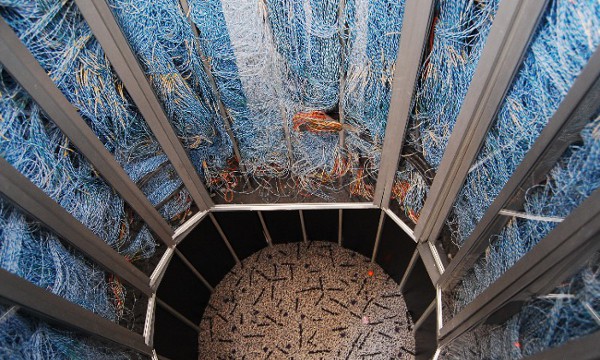
Cray 1 Core
Cray 1 Core, image by carrierdetect

Supercomputers themselves are an interesting research topic and excite scientists of many branches of computer science. I myself have been working in the area of tool development for high performance computing, an area closely related to supercomputers. I therefore follow the current development in this area and even dare to speculate about what is going to happen next.

Recent Development

We have seen how the gaming industry and high performance computing stakeholders started working together to develop the Cell microprocessor architecture that is being used both for game consoles and supercomputers. Recently, a similar collaboration caused an outcry in the global supercomputing community when China finished their Tianhe-1A system that achieved a peak computing rate of 2.507 petaFLOPS making it the fastest computer in the world. It is a heterogeneous system that utilizes Intel XEON processors, Nvidia Tesla general purpose GPUs and NUDT FT1000 heterogeneous processors (I could not find any information about the latter).

While these computers are impressive, they are built in what I would call the conventional way. These systems are really at the limit of what is feasible in terms of density, cooling and most importantly energy requirements. Indeed, the biggest challenge for even faster systems is energy.

Upcoming Systems

Right now the Chinese system got the upper hand but IBM is building a new system in Germany called the SuperMUC (German). While using commodity processors, this new system will be cooled with water – a concept I suspect we will see a lot in the future. It is expected to drastically reduce energy consumption.

Another computer that is probably going to dwarf everything we have seen so far is Sequoia system by IBM. Utilizing water cooling like the German system, it is a Blue Gene/Q design with custom 17-core 64bit power architecture chips. The supercomputer will feature an immense density with 16,384 cores and 16 TB RAM per rack. As this system is aimed to reach 20 petaFLOPS it is a great step toward the exascale computing goal. Personally I would love to get my hands on a rough schematic of the Blue Gene/Q chip as it somewhat reminds me of the Cell processor: it also has 1 core to run the Linux kernel and a number of other cores for computation. What I would like to know is if the cores share memory or if they have dedicated user programmable caches that are connected via a bus.

Frostburg, The Connection Machine CM-5
The Connection Machine CM-5, image by Ryan Somma

The role of ARM

I’ve been wondering for a while now if ARM will try to get a foot into the HPC-market. ARM Holdings is a semiconductor (and software) company that licenses its technology as intellectual property (IP), rather than manufacturing its own CPUs. There are a few dozen companies making processors based on ARM’s designs including Intel, Texas Instruments, Freescale and Renesas. In 2007 almost 3 billion chips based on ARM designs were manufactured.

While ARM is considered to be market dominant in the field of mobile phone chips, they just recently started to break into other markets, especially servers and cloud-computing – also including high performance computing. Their new Cortex-A15 processor features up to 4 cores, SIMD extensions and a clock frequency of up to 2.5GHz while being very power-efficient. We will have to see how this plays out but I can imagine that for example the Exascale Initiative is very interested in something like this.

Your own embedded supercomputer (sort of)

A processor similar to the new Cortex-A15 is the OMAP 4 CPU by Texas Instruments. It is a Cortex-A9 dual core processor with SIMD extensions. While targeted at mobile platforms, this CPU is very similar to the upcoming high performance chip since it supports the same instruction set. There exists a cheap, open source development board for aforementioned Coretex-A9 called the Pandaboard. It sells for less than $200 and is a complete system that runs Ubuntu. In my opinion, this can be seen as single node of a high-performance but power efficient computer cluster.

Open Kinect Prize

As stated in my 3D Vision for Embedded Systems post, Microsoft’s Kinect could be an extremely useful tool to give robots 3D vision. Now the fine people from Adafruit offer a prize for it. If you can provide open source software that gives access to the Kinect video signal (RGB) and distance values they will pay you 1000$. A tempting offer. I’m looking forward to seeing the results.

Update: The guys from ifixit.com got their hands on a Kinect and took it apart. The article shows detailed images of everything and even identifies all integrated circuit chips found inside the device.

Second update: Adafruit increased their offer to now $3000 and it looks like the problem isalready solved, at least partially. Check out this youtube video of the Kinect displaying RGB-D information on Windows 7. The depth information looks somewhat weird though. New updates can be found here. This video shows what the infrared projection of Kinect looks like. Pretty cool!

Third update: It is done! There now exists an open source driver for Microsoft’s Kinect. Adafruit announced the winner of the $3000. And more importantly the code can be found here.

Diffie-Hellman key exchange in Javascript

The Diffie-Hellman key exchange protocol (RFC2641) is an efficient way for two parties (that do not know each other beforehand) to establish a shared secret. This secret can then be used for encrypted communication between the two parties. Because of the simplicity of the algorithm it is a feasible to implement it in Javascript. It could serve as a way to communicate between to participants of a social network in a host-proof way (meaning the host can not access the messages that are exchanged between Alice and Bob).

The following straight forward implementation is based on the ingenious BigInt Javascript library created by Leemon Baird:

function d_h()
{
  // Alice tries to send to Bob, they agree on a 256 bit prime
  var p = str2bigInt(
    "10883804965994030335610375728683210724614077" +
    "5791152305372594007835539736018383", 10, 80);
  var g = str2bigInt("2", 10, 80);       // and on a generator

  // Alice chooses her secret randomly
  var a = str2bigInt(
    "3103830701216420526524336327874353922197141754" +
    "5159778383387464250", 10, 80);

  // Bob chooses his secret randomly
  var b = str2bigInt(
    "26264611999731746945409581849451656136966431" +
    "516270225144913718599547", 10, 80);

  // calculate the public key
  var A = powMod(g,a,p); var B = powMod(g,b,p);

  // A and B are exchanged publicly
  // Alice and Bob can compute the same key from A and B
  var a_sec = powMod(B, a, p);
  var b_sec = powMod(A, b, p);

  alert(bigInt2str(a_sec, 10) + '\n ' + bigInt2str(b_sec, 10));
}

Update: Please note that the following code might produce an insecure generator. An alert reader pointed out that the values it returns for g are too small.

In case you wonder how to choose p and g – so did I. Turns out a generator for those numbers is part of the Crypto++ library. The following application uses this library to calculate p and g with different length.

#include <iostream>
#include <vector>
#include <tclap/CmdLine.h>
#include "dh.h"
#include "osrng.h"

using namespace std;
using namespace CryptoPP;
using namespace TCLAP;

int main(int argc, char** argv)
{
                                                   // read command line
  CmdLine cmd("Diffie Hellman p g generator", ' ', "0.1");
  UnlabeledMultiArg<unsigned int> m("bv", "bits and values", true, "");
  cmd.add( m ); cmd.parse(argc, argv);
  vector<unsigned int> mv = m.getValue(); mv.push_back(1);
  unsigned int bv = mv[0]; unsigned int nv = mv[1];

  AutoSeededRandomPool arngA;                       // generate p and g
  RandomNumberGenerator& rngA =
    *dynamic_cast<RandomNumberGenerator *>(&arngA);
  for(unsigned short i=0; i<nv; i++)
  {
    DH dhA(rngA, bv);
    cout << "p=" << dhA.GetGroupParameters().GetModulus() << " g=";
    cout << dhA.GetGroupParameters().GetSubgroupGenerator() << "\n";
  }
  return 0;
}

The application uses the TCLAP library to parse the command line. The first parameter should be the width of the prime number in bits, the second optional parameter specifies how many primes and generators should be calculated.

Here’s a list of p and g I generated with different widths:

128 bits:
p=197221152031991558322935568090317202983 g=2

256 bits:
p=11245712998331706449413325803449175679094351102802336690101496856041
0379195027 g=3

512 bits:
p=85591083890203292422929753448312002013227700164244056883767436387780
3988137714894694780639823858404151944019992782250585325661689168497741
6276395927762259 g=3

1024 bits:
p=10756096062425499020105845514001321706994933124811434157429824859705
5584898126321093330768462486995125563469663163251404817709163750190539
8111908385982976186475492023836046174671146008757104643109463540714363
4989690852152224155785251701387082100575086970999263664414942032660939
2283245879753842682719140993487 g=2

2048 bits:
p=28401819833194672263220074318568239913240629340614134316461681527129
7400190276361407578313119949940155208450277590596255133024483132860231
2683364685437571458516690608818388566379408009734093619889676676688482
4330230759478149039933887325452487112982841213248410034360015394086822
8492443771741195501623918057531604439427869721645027989688343068984123
6647850119363273567137904693671110310979494733094653291727319950103948
4827099108375018229688415849095088940888827138097109161920916553046346
9800257941704054817481593649080741474714321422084101095199976587101477
59474207550469840261684005212634493995003979085986141372247 g=2

Those numbers do not have to be calculated every time but in fact can be hard-coded in your application.

Sphinx Cheatsheet

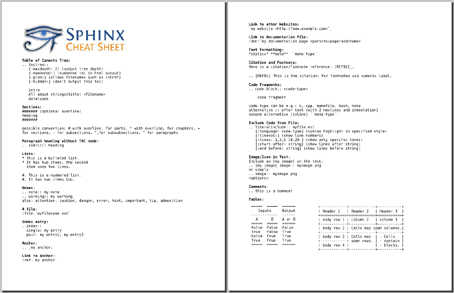
I find myself working with the Sphinx Documentation Generator a lot recently. It is a great tool to easily create intelligent and beautiful documentation and it is based on reStructuredText. I put together a cheat sheet of all the commands I frequently use. There are a number of very good ones out there ([1] [2] [3] [4]) but I find it more convenient to work with my own.

You can access the PDF from here and the source (OpenOffice Writer document) here. If you find it useful or would like an item added, feel free to leave a comment.

Back to Browser Games

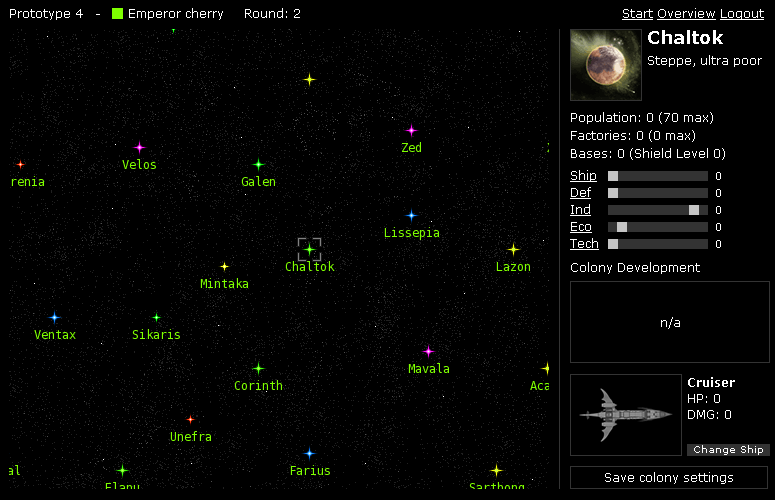
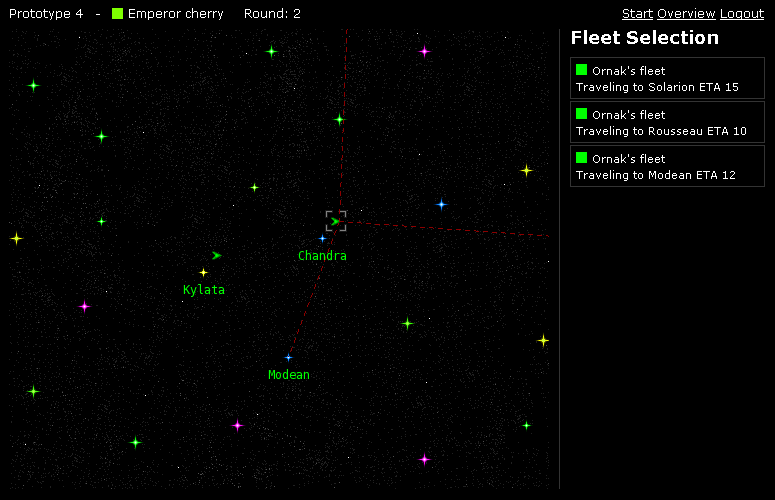
I’m back thinking about games, browser games to be exact. It’s been a while since I thought about games or wrote code for one – it’s been about 1 year since I stopped developing a prototype I called ‘Prototype 4′ which is a web based Master of Orion clone. I was working on the game full time for about a month but then had to stop because I had to take up a job to get some money and I also had to finish my diploma thesis. It progressed fairly far further than any other of my prototypes in fact: I created some nice graphics and a layout, a cool javascript user interface, a very efficient yet flexible back end library in PHP and a C++ battle calculator. Here are 2 screenshots of what the game looks like:

Prototype 4 Screenshot 1 Prototype 4 Screenshot 2

This was supposed to be a very literal copy of Master of Orion that you could play online with up to 15 other players on one map. Yet now I have something different in mind and I also have a different approach. It will only be a hobby project and I don’t plan to get immediate results, I want it to progress and evolve in my mind until I’m at a point where I can start writing code. Writing the code should be just handcraft at that point as I have most of the skills and knowledge to develop such a game.

What I’m doing now is writing a design document. The design will be highly influenced by the Foundation Series, one of the greatest science fiction series ever written. The first version of the design document can be found here. I still want the game to have a Master of Orion look and feel to it and it will certainly be a 4X type of game but I want different factions to be completely different (comparable to the different races in Starcraft) in the way they are played. I would like to see a “First Foundation” faction that relies on technology, economy and firepower and a “Second Foundation” faction that relies solely on the power of their minds, e.g. mind control. More about that can be found int the design document. A third faction is also possible but I have no concrete ideas about that yet. As the game design and the game itself progresses I will occasional write articles about it here on this blog.

Matlab C++ Integration

I’m currently working on integrating some Matlab Algorithms into a larger C++ project using the Matlab Compiler. It works rather well however I stumbled across a couple of quirks and caveats. First two facts that make integrating Matlab difficult: in Matlab indexes start at 1 and Matlab arrays are column-major ordered. As a result if you want to use data fields in both C/C++ and Matlab you have to transpose the fields. If the fields contain indexes you might also have to increment and decrement the values of the fields.

Another caveat I found is also related to array indexes. When using a Matlab function that takes as parameters matrix indexes you might think of creating an mwArray of type mxUINT32_CLASS. Wrong. You have to pass indices – as strange as it sounds – as doubles so you should use mxDOUBLE_CLASS.

One custom Matlab function I wanted to use in C++ took as an argument a cell array. A cell array is an array containing other arrays. In Matlab you create a cell array like this:

a = magic(5);
b = ones(3);
z{1} = a;
z{2} = b;

If you look at z now you will get something like this:

z =
[5x5 double] [3x3 double]

An array of arrays. Easy. Well if you want to construct a cell array in C++ you have to do something like this:

mwArray a(5, 5, mxDOUBLE_CLASS);
mwArray b(3, 3, mxINT16_CLASS);
mwArray z(1, 2, mxCELL_CLASS);
z.Get(1,1).Set(a); // Sets z(1) = a
z.Get(1,2).Set(b); // Sets z(2) = b

You can find the description on this page.
If you get used to those little quirks however the Matlab Compiler is a very powerful tool to include your crazy Matlab scripts in a stand alone C++ application. One of the next things I would like to investigate are free (open source) Matlab Compiler alternatives such as the Octave C++ integration and compiler.

Visualizing Multithreading

I’ve been pondering about the question of how to model and visualize multithreaded applications in a simple, efficient and aesthetic way. Naturally I’ve been looking into UML behavior diagrams first but I was not really satisfied with what I found. Now I am not an expert on UML but I know my way around class diagrams, activity diagrams, sequence diagram and state machines but they all did not seem to fit what I wanted to visualize.

I wanted to show multiple threads communicating and synchronizing with each other. I’ve read the argument that something like multithreading concerns only the implementation of a system and can thus be ignored when modeling. I agree with the argument however there will come a time in the development phase of a system when one needs to think about multithreading and one wants to sketch out how the system facilitates multiple threads to be efficient. And for that I have not found good tool within UML.

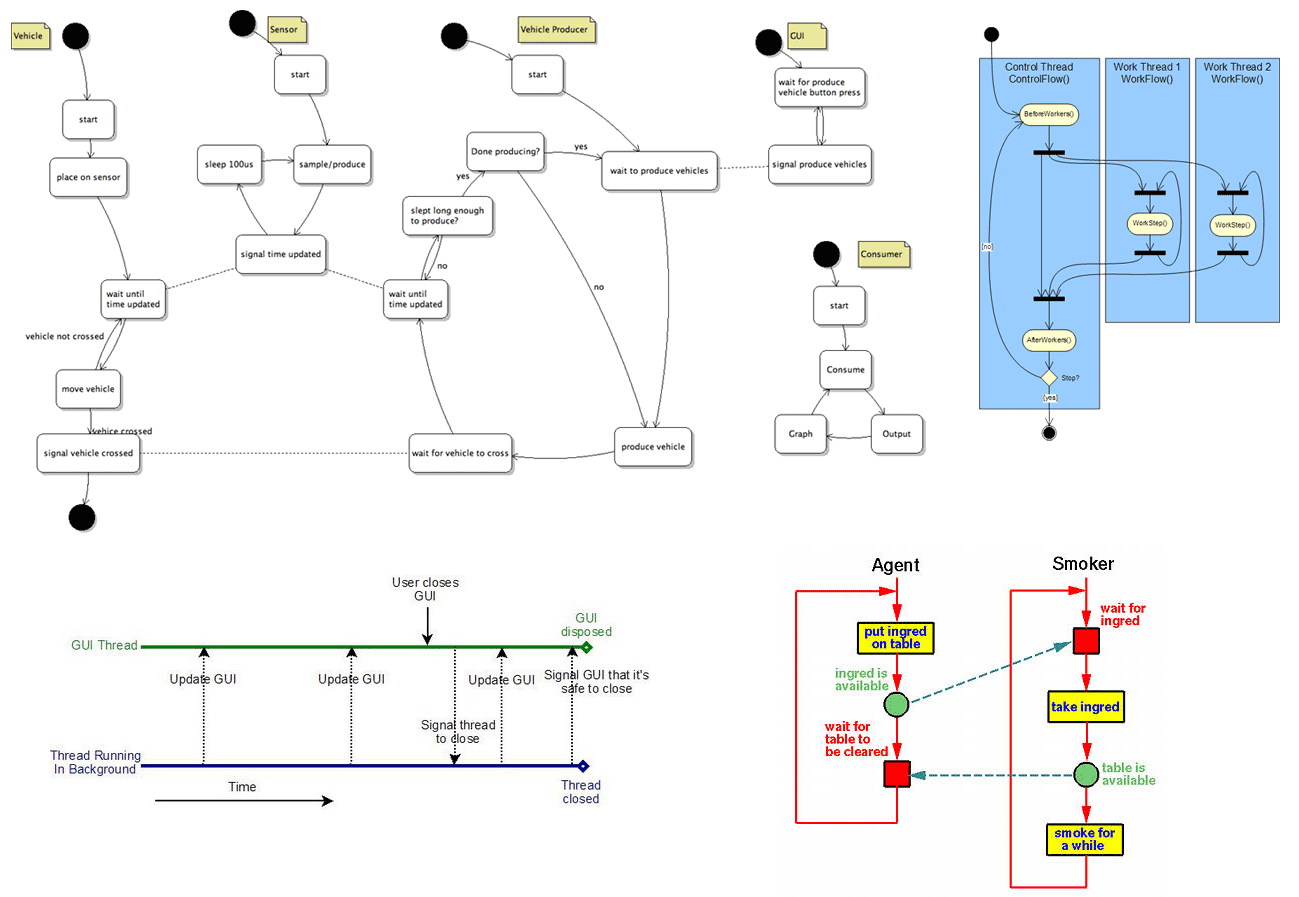
multithreadingsmall

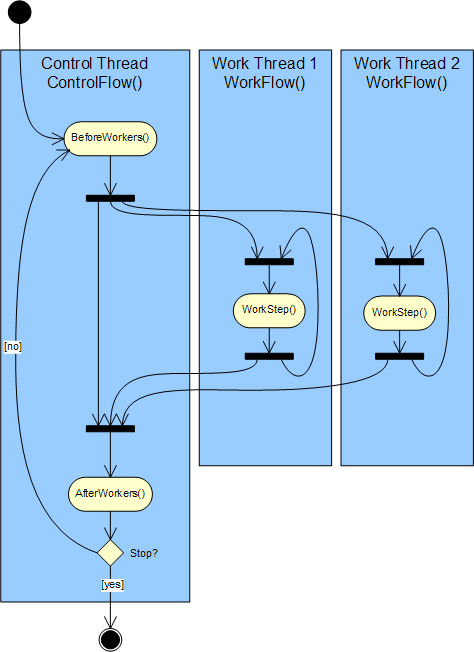
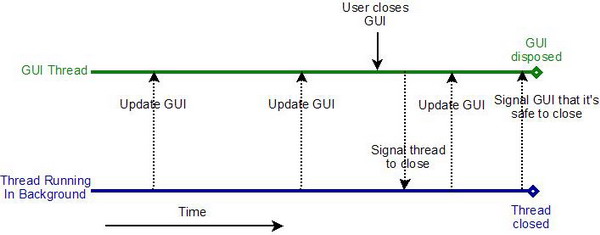
So I searched for examples of diagrams that visualize multithreading. The collage shows 4 different diagrams I found rather interesting. The first one is from this page about a traffic simulator written in Java (orignal image). It shows different threads and how they signal each other. It’s simple yet quite clear what is going an. The second image is taken from a CodeProject documentation about a genetic library (original image). It sort of uses UML symbols but it’s not clear what happens at the fork and join points. The way I figure it, those symbols inside the threads are supposed to be branches not forks. The third image is also from a CodeProject page – this time it’s a how-to about avoiding an exception when using multiple threads (original image). It reminds me of a sequence diagram. There are no blocking states in the diagram and I figure in this particular application the threads are non-blocking so diagram fits the application perfectly. The fourth diagram I liked the most. It’s from the Multithreaded Programming with ThreadMentor tutorial (original image) and has special symbols for sending signals and waiting for signals.

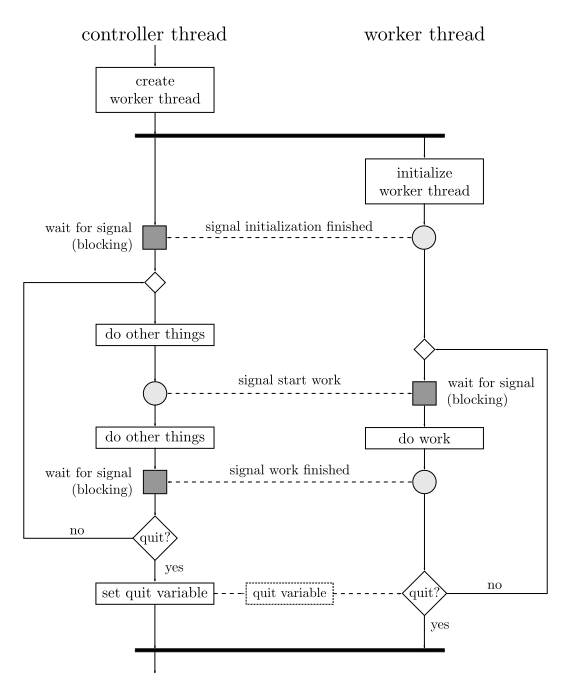
threading

So I gave it a try myself and tried to model a simple controller and worker thread scenario based on the last of the example diagrams I found. The gray boxes and circle represent a signaling concept where one thread can send a signal and the other thread waits until it receives the signal. I also included a shared variable that handles the task shutdown. One thread can set the variable and the other branches depending on that variable. I am not happy yet with this particular part of the image. If anyone has a better idea or pointer to resources on that topic feel free to leave a comment.

My 25 favorite Windows Applications

Here’s a list of my 25 favorite windows applications. They are all open source or free to use. By the way with most Linux distributions you get the functionality those tools provide right out of the box.

Favorite Windows Applications

7-Zip is an open source file archiver with a high compression ratio. It supports all common archive types. Avast is a free (for personal use) anti virus kit, that protects my system from all those nasty pieces of software out there. Cygwin is an ingenious collection of tools that provides a Linux-like environment for Windows. You can use it with puttycyg to get a very easy to use Linux-like shell with all the tools you miss so badly on Windows. And for those good old DOS games you miss so much there’s DOSBox, the x86 emulator with DOS. Check out a number of old free but totally awesome games you can play on the DOSBox here. For file-transfers there’s FileZilla for FTP and for SFTP there’s WinSCP. And of course there’s everybody’s favorite browsers Firefox and Opera for browsing and ‘being connected’. From what I hear Opera 10 will be out any day now. For my document viewing, editing and creation needs I heavily rely on Texmaker, MiKTeX, GSview and of course OpenOffice.org.

For image creation I just love Inkscape. It has to be one of the greatest open source tools ever created. For graph creation I use gnuplot also I have to say I have been using the graphing tools of MATLAB a lot lately due to ease of use. For text and code editing I use either Notepad++ or Vim. It depends on my mood really. To communicate online I use mostly the cute pidgin universal chat client but I also sometimes log on to IRC using mIRC. For all my media and entertainment needs I have the great and famous VLC media player of course but I tend to use Winamp for audio playback. To download torrent files I use µTorrent and to connect to remote servers I use PuTTY.

I use XAMPP for web development and the ingenious VirtualBox x86 virtualization software for testing on different systems. When my harddrives are a cluttered mess I use WinDirStat to get a hold of the chaos and clean it up. And recently I accidentally deleted files from the SD-Card of my mobile phone and was able to recover them instantly using the awesome Photorec data recovery software.

That’s it for my list. I hope someone out there will find this list useful.

Search, search and communicate!

There’s quite a lot going on in the ever interesting internet search and communication business these days. Wolfram launched its Wolfram|Alpha search engine, Microsoft launched its new Bing search engine and Google demoed its newest product Wave. They also rather quietly released Google Squared. Here’s a graph generated with BlogPulse’s Trend Search showing the buzz these products created over the last month.

Search and communication product buzz

I admit the graph is a bit ambiguous and it would be much better to count the number of links in blog posts that link to the respective product. But let’s just assume that the graph is an accurate representation of the buzz those products created.

So Wolfram. I like what they did but have a couple of problems with it. For one I feel like they kind of not understood what it is all about these days. They ignore collaboration, wisdom of the crowd, free knowledge and all that good stuff we have today. But they don’t want that, they want scientific accuracy and control over their content. That’s fine I think but I would have loved to see all those smart people to contribute to a project like Wikipedia or freebase. And maybe they could have dedicated some of their enormous brainpower to finally getting NLP off the ground to provide a nice interface to all the information out there and to establish some ground rules about how we should do NLP.

Bing, well – pretty pictures. That’s really all it is for me personally. The name is certainly better than their Live Search thing but I don’t like the interface at all.

And then for Google Wave: I really hope this product will not succeed and will not revolutionize anything. It’s in the first few minutes of the demo why it would be very scary to have Wave around. Lars Rasmussen says that E-Mail is bad because it’s peer to peer, not very comfortable and whatnot. So he proposes to put the Wave (i.e. Google) in the middle of all that communication. Scary.

What’s really awesome is Google Squared. It’s by no means perfect – still a lot of rough edges – but has a lot of potential. I hope to see some serious work done on that thing and maybe an API for us developers to play with and create new things.

Convertig CSV files to LibSea graph files for CAIDA’s Walrus

Quite a few responses to my posts about social network visualization with Walrus contained questions about how to create the input files for Walrus. Walrus itself is very well documented and the LibSea graph file format is also explained in detail. But people seem to run into trouble when trying to create the spanning tree required for Walrus.

The Walrus documentation states that it only makes sense to visualize data that contain a meaningful spanning tree and that visualizations created with the help of an arbitrary spanning tree are not very useful. While that’s probably true the visualizations still look awesome. And I guess that’s what people want. Furthermore Raffael Marty from secviz.org contacted me and asked if I had a tool that could read CSV files as input and output a LibSea file for Walrus.

I didn’t have such a tool but it sounded like a fun challenge and I thought that such a tool might also help all the people who run into trouble when trying to create a spanning tree for their graphs. So I created walruscsv – a command line tool written in C++ that reads a CSV and outputs a LibSea graph file that can be visualized with Walrus. The CSV file hast to contain a link in each row and consist of 2 columns. The first column in each row represents the first node of the link and the second column the second node of the link. It automatically generates an arbitrary spanning tree.

A sample CSV file containing the links node1<->node2, node1<->node3, node3<->node4 could look like this:

node1,node2
node1,node3
node3,node4

Although Walrus is only capable of visualizing one network at a time walruscsv can handle multiple networks in one CSV file. It creates an arbitrary node and connects a node of each network to that node enabling Walrus to visualize the data. Currently the tool creates an arbitrary spanning tree so it’s not weighted and therefore not minimal.

Walruscsv reads the name of the CSV file to process as the first command line parameter passed to it. It is released under a non restrictive open source license so in addition to binaries the source code is provided. To compile it using the GNU C++ compiler simply type:

g++ wlink.cpp main.cpp wtree.cpp -o walrus.exe

You can use the program by typing

walrus.exe testfile1.csv

whereas testfile1.csv is the CSV file containing the graphs you want to visualize. Bloodshed Dev-C++ can also be used to compile the code and although I didn’t try it it should also work with C++ compilers from Microsoft (e.g. using Visual Studio). Here are the files:

Source code (the source code released to the public domain)
Test files (a collection of test CSV files)
Win32 binary
Debian x86 64bit binary

If you’re having trouble using or compiling the tool or if you have suggestions or comments of if you find a bug feel free to contact me or leave a comment.


« Newer PostsOlder Posts »